BI Docs: Automated Documentation for Data Platforms
Business intelligence environments have a documentation problem, and it’s not the kind that a wiki solves.
Over the years, I’ve watched critical knowledge accumulate in the worst possible places: email threads, meeting transcripts, Slack messages, and in the heads of people who eventually leave. Thresholds that determine how revenue gets bucketed. Cutoff dates baked into SQL queries. Business rules that exist because someone in Finance asked for them in 2022 and nobody wrote it down.
When I decided to leave my last role, I didn’t want to be that person who walks out with half the platform’s context in their head. So I built a system to capture it, organize it, and keep it honest after I was gone.
I call it BI Docs. It’s not a product. It’s a pattern: a way to build and maintain up-to-date documentation for data platforms using MkDocs and a lightweight AI review layer. The stack I used was Databricks and Power BI, but the approach is portable to any combination of ETL and reporting tools.
Phase 0: Building the Baseline
The hardest part of any documentation effort isn’t the tooling. It’s the initial excavation.
When I started, the “documentation” for our data platform was scattered across hundreds of emails, dozens of Jira tickets, a few architecture powerpoints that were two years out of date, and a SharePoint site that nobody visited. The first job was to gather all of that into a single place and make sense of it.
This is where AI proved genuinely useful. Not as a writer, but as a librarian. I used markitdown to convert documents from all the usual formats (Word, PDF, PowerPoint, HTML emails) into clean Markdown that an LLM could parse. The workflow looked like this:
- Collect everything. Emails from stakeholders containing requirements. Jira tickets describing feature requests and bug fixes. Architecture diagrams. Meeting notes. SharePoint pages. Database schemas.
- Convert to Markdown. Using markitdown, I transformed these documents into a uniform format. This is the critical step. LLMs work best when they can read plain text, and Markdown is a practical intermediate format that both humans and machines handle well.
- Feed and filter. I used GitHub Copilot to help me extract the actual facts from the converted documents: business rules, column definitions, threshold values, timeline decisions. The AI accelerated the extraction, but I reviewed and curated every single page. There is no shortcut here. AI will confidently present irrelevant or wrong information next to useful facts, and only someone who understands the domain can tell them apart.
The output of Phase 0 was a structured MkDocs repository containing everything the team needed to understand the platform. The AI didn’t write the documentation. I wrote it, using AI as a high-speed research assistant.
The Ground Truth: Data Decision Records (DDRs)
Before we jump into the tooling, we have to talk about format. You cannot just dump a 30-page requirements document into a repository and expect an automated system (or a human) to parse it effectively when code changes.
The documentation needs to be specific, isolated, and structured. To achieve this, I used Data Decision Records (DDRs).
A DDR is a lightweight markdown file committed to Git that captures one specific architectural or business logic decision. It’s an adaptation of Michael Nygard’s Architecture Decision Records (ADRs), but tailored for data platforms.
When a junior analyst looks at a strangely complex UNION ALL in a fact table and thinks, “I can optimize this,” the DDR is the single file that explains exactly why that join exists (e.g., a recurrent accounting restatement process mandated by Finance).
A DDR has three core sections:
- Context: The problem and the environment (e.g., “Sales targets arrive on the 5th, but Finance closes on the 3rd.”)
- Decision: The exact logic implemented to solve it.
- Consequences: The known downstream impacts of this decision.
By forcing documentation into this highly granular DDR format, the AI review layer (which we’ll cover shortly) has a much easier time mapping a specific Git diff to a specific business rule.
In practice, I recommend storing DDRs under docs/requirements/ddrs/ with a filename convention like 20260223-fiscal-year-cutoff.md. That keeps them easy to sort chronologically while still being specific enough to reference from reviews.
Here’s a minimal DDR template:
# DDR-20260223: Fiscal Year Cutoff Logic

## Context
Finance closes the month on the 3rd, but sales targets arrive on the 5th.

## Decision
Use the previous month's targets until the current month's targets are loaded.

## Consequences
Dashboards show a two-day lag at the start of each month.
Any change to this timing must be reflected in the Services dashboard docs.
Getting Started with MkDocs
If you haven’t used MkDocs before, it’s a static site generator designed specifically for project documentation. You write Markdown files, organize them in folders, and MkDocs builds a clean, searchable website. Combined with the Material for MkDocs theme, the result looks professional with almost zero effort.
Installation
MkDocs runs on Python. To set up a new project:
# Install MkDocs and the Material theme
pip install mkdocs mkdocs-material

# Create a new documentation project
mkdocs new bi-docs
cd bi-docs

# Start the local dev server
mkdocs serve
This gives you a live preview at http://127.0.0.1:8000 that updates every time you save a file.
Configuration
The mkdocs.yml file at the root of your project controls everything. Here’s a starting point:
site_name: BI Platform Documentation
theme:
  name: material
  palette:
    scheme: default
    primary: indigo
    accent: teal
  features:
    - navigation.sections
    - navigation.expand
    - search.suggest
    - search.highlight
    - content.code.copy

plugins:
  - search

markdown_extensions:
  - admonitions
  - pymdownx.details
  - pymdownx.superfences
  - pymdownx.tabbed:
      alternate_style: true
  - tables

nav:
  - Home: index.md
  - Data Sources: data_sources/index.md
  - Data Models: data_models/index.md
  - Requirements: requirements/index.md
  - Timelines: timelines/index.md
  - Glossary: glossary/index.md
  - Dashboards: dashboards/index.md
  - Architecture: architecture/index.md
  - Review: review/index.md
Building for Production
When you’re ready to publish:
# Build the static site
mkdocs build

# The output goes to the /site directory
# Deploy to GitHub Pages, Azure Static Web Apps, or any static host
mkdocs gh-deploy  # shortcut for GitHub Pages
The Repository Structure
The folder hierarchy should reflect two things: the logical structure of your data platform and the team structure of your organization. Different sections will have different audiences. A business analyst cares about glossaries and dashboard definitions; a project manager cares about requirements and timelines.
Crucially, do not duplicate your column-level definitions. Modern data engineering dictates that documentation lives close to the code (e.g., in table comments, a schema registry, or a data catalog). BI Docs and MkDocs should be reserved for high-level concepts: business requirements, Data Decision Records (DDRs), architecture standards, and timelines. Do not create a fact_sales.md in MkDocs that just lists columns, as you guarantee that documentation will rot.
Here’s the structure I settled on:
bi-docs/
├── mkdocs.yml
└── docs/
    ├── index.md                    # Landing page with platform overview
    │
    ├── data_sources/               # Where the data comes from
    │   ├── index.md                # Summary of all source systems
    │   ├── crm_system.md           # CRM ingestion details
    │   ├── erp_financials.md       # ERP feed documentation
    │   └── third_party_api.md      # External API contracts
    │
    ├── data_models/                # Architectural modeling decisions (NOT column specs)
    │   ├── index.md                # Modeling conventions and standards
    │   └── architecture_notes.md   # Broad architectural decisions
    │
    ├── requirements/               # Why the data looks the way it does
    │   ├── index.md                # How to read and contribute requirements
    │   ├── req_fiscal_year.md      # Fiscal year cutoff logic and its history
    │   └── req_product_flags.md    # Product categorization rules
    │
    ├── timelines/                  # When decisions were made
    │   ├── index.md                # How the timeline works
    │   └── 2024_decisions.md       # Chronological log of platform decisions
    │
    ├── glossary/                   # What the terms mean
    │   ├── index.md                # Glossary conventions
    │   └── business_terms.md       # Revenue, Net Sales, Active Customer, etc.
    │
    ├── dashboards/                 # What the business sees
    │   ├── index.md                # Dashboard inventory
    │   ├── executive_dashboard.md  # Measures, filters, upstream dependencies
    │   └── regional_sales.md       # Regional breakdown report
    │
    ├── architecture/               # How the platform is built
    │   ├── index.md                # Architecture overview
    │   ├── etl_patterns.md         # Standard ETL patterns (incremental, full)
    │   └── platform_norms.md       # Naming conventions, branching strategy
    │
    └── review/                     # Where the AI review system lives
        ├── index.md                # How the review process works
        ├── meta.md                 # The orchestration prompt
        ├── architect.md            # The "Architect" persona prompt
        ├── reviewer.md             # The "Reviewer" persona prompt
        └── runs/                   # Review run history
            └── 2026-02-23T10-00/
                └── review.md       # Findings from this review run
A Note on Audiences
Not everyone needs to read everything. When I structured the docs, I kept this mapping in mind:
| Section | Primary Audience | Purpose |
|---|---|---|
| Data Sources | Data Engineers | Understand ingestion contracts |
| Data Models | Data Engineers, Architects | High-level patterns (Column details belong in the data catalog) |
| Requirements | Everyone | Know why things are built the way they are |
| Timelines | Architects, Managers | Track decision history and accountability |
| Glossary | Analysts, Business Users | Align on term definitions |
| Dashboards | Analysts, Stakeholders | Map reports to upstream models |
| Architecture | Engineers, Architects | Platform standards and conventions |
| Review | Engineers | AI-assisted review process |
The Automated Layer: Keeping Docs Honest
Phase 0 gets you a comprehensive documentation baseline. That’s valuable on its own, but documentation rots. The moment someone changes a column name in Databricks or updates a DAX measure in Power BI without touching the docs, the baseline starts to drift.
The automated layer is designed to catch that drift. The idea is straightforward: when someone makes a change to the ETL code (Databricks notebooks, SQL files, PySpark scripts) or the reporting layer (Power BI semantic model files via Git integration), the system compares the change against the existing documentation and flags mismatches.
It doesn’t fix the code. It doesn’t rewrite the docs autonomously. It raises a flag and says: “This change affects documented behavior. Here’s what you should review.” The developer always makes the final call.
The Architecture
Here’s the high-level flow:
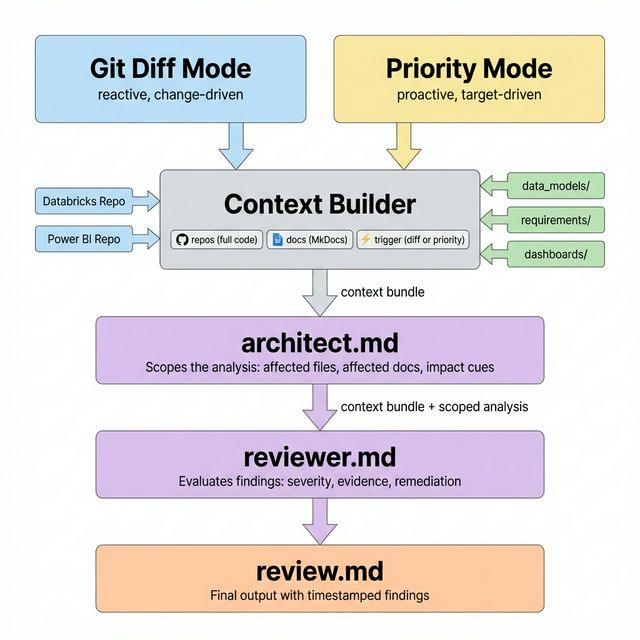
The diagram shows a simple sequence: trigger, context assembly, architect pass, reviewer pass, and a final timestamped report. If you present this pattern internally, keep that caption with the image so the flow is still understandable in screen readers, exports, and chat previews.
The system supports two entry points. Git Diff Mode computes the diff between the current branch and main, reacting to code changes. Priority Mode takes a plain-language focus area (e.g., “validate docs against the Services dashboard”) and proactively audits a specific part of the platform.
Regardless of the entry point, the pipeline is the same:
- The Context Builder assembles a context bundle: the trigger (diff or priority text), the full source code from the target repos (Databricks, Power BI), and the relevant documentation from the MkDocs repository (data models, requirements, dashboards).
- The Architect (
architect.md) receives the full context bundle. It scopes the analysis by identifying which code files and which documentation pages are affected, and provides impact cues. Its output is appended to the context bundle. - The Reviewer (
reviewer.md) receives the enriched context bundle—everything the architect identified, plus the original code and docs. It evaluates the findings, assigns severity, cites evidence, and writes suggested actions. - The final output is written to a timestamped
review.mdunder.review/runs/.
There are multiple ways to trigger this: Git hooks running locally, CI/CD pipeline steps on pull requests, or scheduled jobs. For documentation reviews, I’d recommend keeping a human in the loop—have the system generate the review, but let the engineer decide what to act on. Automated gates that block merges based on AI findings introduce friction that teams tend to disable after the first false positive.
If you want a lightweight CI starting point, a pull request workflow can be as simple as this:
name: bi-docs-review

on:
  pull_request:

jobs:
  review:
    runs-on: ubuntu-latest
    steps:
      - uses: actions/checkout@v4
        with:
          fetch-depth: 0

      - name: Generate BI Docs review
        run: |
          python scripts/run_bi_docs_review.py \
            --mode git \
            --base main \
            --output .review/runs/${{ github.event.pull_request.updated_at }}/review.md

      - name: Upload review artifact
        uses: actions/upload-artifact@v4
        with:
          name: bi-docs-review
          path: .review/runs/
The exact runner script will depend on your setup, but the shape should stay the same: compute the diff, build the context, run the two prompts, and persist the review as an artifact instead of silently discarding it.
The Meta-Prompt: A Two-Agent Review System
Rather than a single monolithic prompt, the review system uses two separate agent personas that run sequentially. One identifies the affected area, the other evaluates the impact.
Setting Up the .review/ Folder
The review system lives inside your BI Docs repository:
.review/
├── meta.md          # Orchestration: which prompts to run and in what order
├── architect.md     # Agent 1: Identifies affected documentation
├── reviewer.md      # Agent 2: Evaluates impact and writes findings
└── runs/            # Output directory for review results
    └── .gitkeep
meta.md — The Orchestrator
This file defines the review pipeline. It tells whatever tool you’re using (Copilot CLI, a custom script, a CI/CD action) what to do:
# BI Docs Review Pipeline

## Usage

Execute this prompt with one of the following:

- `execute meta.md with git diff`
  Runs a change-driven review. The pipeline computes the diff
  between the current branch and main, then identifies which
  docs are affected.

- `execute meta.md with priority: <description>`
  Runs a target-driven review. For example:
  `execute meta.md with priority: validate docs against the Services dashboard`
  `execute meta.md with priority: audit the fiscal year cutoff logic`

## Inputs
- `target_repos`: List of repository paths to monitor
- `docs_repo`: Path to the BI Docs MkDocs repository

## Steps — Git Diff

1. **Identify Changes**
   - For each target repo, compute `git diff HEAD main`
   - Filter to relevant file types: `.py`, `.sql`, `.dax`, `.bim`, `.tmdl`
   - Execute `architect.md` with the diff as context

2. **Evaluate Impact**
   - Take the output from Step 1 (list of affected doc pages)
   - Load the content of those doc pages from the MkDocs repo
   - Execute `reviewer.md` with the diff + doc content

3. **Write Results**
   - Save the reviewer's output to `runs/<timestamp>/review.md`
   - List affected files and flag severity (info, warning, critical)

## Steps — Priority

1. **Scope the Priority**
   - Execute `architect.md` with the priority text as context
   - The architect identifies which codebase files and which
     documentation pages are relevant to the priority,
     and provides impact cues for the reviewer

2. **Evaluate Alignment**
   - Load the identified code files and doc pages
   - Execute `reviewer.md` with the code + doc content
     and the original priority as context

3. **Write Results**
   - Save the reviewer's output to `runs/<timestamp>/review.md`
   - Include the priority text as a header for traceability
The two modes serve different purposes. The git mode is reactive—it runs after a change and catches drift. The priority mode is proactive—you use it when you want to validate a specific area of your platform against the documentation, for example before a stakeholder presentation or after onboarding a new team member who will own a particular dashboard.
architect.md — The Identifier
This agent adapts its behavior based on the mode. In git mode, it maps code changes to documentation. In priority mode, it scopes the review by identifying which parts of the codebase and which docs are relevant to the stated priority.
# Role: Data Platform Architect

You are reviewing a data platform against its BI documentation.

## Mode: Git (Change-Driven)

When provided with a git diff:
- Identify which documentation files are potentially affected.
- Look for changes to column names, data types, table structures,
  join conditions, filter logic, and hardcoded values.
- Map each change to the most specific documentation page.
  For example, a change to the `dim_customer` table maps to
  `docs/data_models/dim_customer.md`.
- If a change introduces or modifies a business rule (e.g., a
  fiscal year threshold), map it to the relevant requirement
  in `docs/requirements/`.
- If a backend change affects columns used by a Power BI measure,
  flag the relevant dashboard page in `docs/dashboards/`.

## Mode: Priority (Target-Driven)

When provided with a priority (e.g., "validate docs against
the Services dashboard"):
- Identify which codebase files are relevant to this priority.
  For example, if the priority mentions a dashboard, find the
  ETL notebooks that feed its upstream tables and the semantic
  model files that define its measures.
- Identify which documentation pages cover this priority.
  Pull from `docs/dashboards/`, `docs/data_models/`,
  `docs/requirements/`, or any other relevant section.
- Provide impact cues to the reviewer: which code-to-doc
  relationships are most likely to have drifted for this
  specific area.

## Output Format
Return a list of:
- **Affected code files** (with a one-line explanation)
- **Affected documentation pages** (with a one-line explanation)
- **Impact cues** for the reviewer (what to look for)
reviewer.md — The Evaluator
This agent receives the diff, the affected doc pages, and the current documentation content. It writes the actual findings:
# Role: Senior Data Engineering Reviewer

You are conducting a documentation impact review.

## Your Task
Given a code change and the current state of the affected
documentation, evaluate whether the docs need to be updated.

## Constraints
- Do NOT summarize the code. Identify specific deviations between
  the code change and what the documentation currently states.
- Check for these patterns:
  1. **Grain changes**: Does this change alter the documented
     row-level granularity of a table?
  2. **Hardcoded values**: Does this change introduce a date,
     threshold, or constant that should be documented or
     externalized to config?
  3. **Cross-layer coupling**: Does a Databricks change require
     a corresponding update in the Power BI semantic model
     or vice versa?
  4. **Naming mismatches**: Has a column or measure been renamed
     in code but not in the docs?

## Output Format
For each finding:
- **Severity**: info | warning | critical
- **Location**: The file and line range in the code
- **Documentation Page**: The affected .md file
- **Finding**: What the deviation is
- **Suggested Action**: What the developer should do
Example Review Output
Here’s what a review run produces. This file gets saved to .review/runs/2026-02-23T10-00/review.md:
# BI Docs Review — 2026-02-23T10:00

**Repos reviewed:** databricks-etl (HEAD: abc1234 vs main: def5678)
**Files changed:** 3 | **Findings:** 2

---

## Finding 1

- **Severity:** critical
- **Location:** `notebooks/silver/sales_transform.py` L45-47
- **Documentation Page:** `docs/requirements/req_fiscal_year.md`
- **Finding:** The fiscal year cutoff date was changed from
  `2024-07-01` to `2025-07-01` directly in the notebook.
  The current documentation states the fiscal year boundary
  is `2024-07-01`. Additionally, this value is hardcoded
  rather than pulled from configuration.
- **Suggested Action:**
  1. Update `req_fiscal_year.md` with the new date and the
     rationale for the change.
  2. Consider moving the cutoff date to a config file or
     Databricks widget parameter to avoid future hardcoding.

---

## Finding 2

- **Severity:** warning
- **Location:** `notebooks/gold/fact_sales.py` L112
- **Documentation Page:** `docs/data_models/fact_sales.md`
- **Finding:** A new column `discount_flag` (BOOLEAN) was added
  to the `fact_sales` Gold table. This column is not yet
  documented in the data model page, and no corresponding
  DAX measure exists in the Power BI semantic model.
- **Suggested Action:**
  1. Add `discount_flag` to `docs/data_models/fact_sales.md`
     with its definition and business meaning.
  2. Coordinate with the BI team to determine if a dashboard
     measure is needed.
What This Isn’t
There are a few things this system does not do.
It’s not a compiler or an AST parser. For teams working in highly structured environments with strict schema registries, a deterministic validation layer (like a custom linter or schema contract tool) will always be more reliable than an LLM. BI Docs is designed for environments where that kind of tooling doesn’t exist yet and may never exist—where the data platform is a collection of notebooks, SQL files, and Power BI datasets held together by institutional memory.
It’s not a knowledge graph. The folder structure is flat and simple on purpose. Knowledge graphs are powerful, but they require significant ongoing maintenance. A set of Markdown files in Git is something any engineer can update with a text editor. If nobody maintains it, at least the content is still readable. A neglected knowledge graph is just a broken database.
It’s not a replacement for an architect. The LLM catches pattern-level deviations, but it doesn’t understand your business. It can flag that a column type changed, but it can’t tell you whether that change is the right call. The human always decides.
!!! warning “EDIT: A Reality Check on LLMs in Data Engineering”
In my [spec-driven BI series](/blog/spec-driven-bi-part1-when-it-works), I argue that using LLMs to *generate* production SQL is an anti-pattern because it introduces non-determinism. I must acknowledge the inherent risk here: using AI to evaluate cross-language semantic impact (Databricks to DAX) relies on the same probabilistic mechanisms. If an LLM can hallucinate a `SELECT` statement, it can absolutely hallucinate an evaluation. BI Docs mitigates this by keeping the AI strictly in a *review and flagging* capacity—never blocking CI pipelines and never writing production code. You are trading a generation hallucination risk for an evaluation hallucination risk. Consequently, alert fatigue is a real danger. The system must remain a lightweight assistant, not an absolute governor.

Tools like [dbt-mcp](https://github.com/dbt-labs/dbt-mcp) (open-sourced in April 2025, GA since October 2025) demonstrate that AI agents can query metric definitions, trace lineage, and run dbt commands through structured interfaces—operating *through* the semantic layer rather than around it. The specific protocol (MCP, REST, GraphQL) matters less than the principle: AI is most useful when it consumes governed, human-authored structures, not when it generates them from scratch.

## Related: Spec-Driven Development

BI Docs enforces documentation-as-code by catching drift between your codebase and your Git-versioned Data Decision Records (DDRs).

In a separate two-part series, I explore **spec-driven development**, which explores the inverse flow: generating physical code from specifications, and why those physical specs fail to capture the semantic reality that DDRs are designed to protect.

- [Part 1: When Specs Work](spec-driven-bi-part1-when-it-works.md) — The infrastructure vs. exploratory distinction
- [Part 2: The Semantic Gap](spec-driven-bi-part2-semantic-gap.md) — The limits of specification and the need for Semantic Layers
Closing Thoughts
The best documentation system is one that survives your departure. Not because it’s automated, but because it’s simple enough that anyone can contribute to it, and grounded enough that people actually trust it.
If you’re a data engineer preparing for a transition, or just tired of answering the same questions about why a threshold is set to 0.15 or why the fiscal year starts in July, start with the evidence. Dig through the emails. Read the old Jira tickets. Talk to the people who were there when the decisions were made. Write it down in Markdown. Put it in Git.
The automation layer is nice. It helps prevent drift. But the real value is the baseline you build in Phase 0. That collection of facts, timelines, and documented decisions is the asset. Everything else is tooling to protect it.
Start small. One repository. One mkdocs.yml. One folder called timelines/ with a single Markdown file logging every decision you can remember. A simple chronological ledger preserves more context than you’d expect, and your successor will thank you for it.